
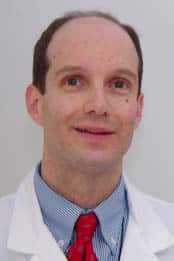
Thank you for viewing my profile. I care for Reliant patients in the hospital.
“I think it’s important for patients to have confidence that they are going to be well taken care of.”
Dr. David Petullo is a big believer in partnering with his patients when it comes to their care. He works hard at building trust and making his patients feel at ease. “I think making patients feel comfortable is all based on communicating well. That’s why I like to pull up a chair and sit next to them when I am discussing something,” he explains. “I think it’s important for patients to have confidence that they are going to be well taken care of.”
The everyday challenge of hospital medicine has a great appeal for Dr. Petullo. “Hospital medicine has always appealed to me. I have always preferred it to outpatient office medicine. It’s just very gratifying to me to see patients leaving the hospital and feeling better.”
As a hospitalist, Dr. Petullo specializes in treating patients who need to be admitted to the hospital for their care. “The work I do ranges from caring for those who have been admitted for illnesses such as pneumonia, heart problems, emphysema and other issues as well as medical consultations with post-surgical patients.”
Dr. Petullo believes in keeping in close contact with the primary care physicians of his patients. “Reliant Medical Group has a great system that allows me to access outpatient records through the computer, which makes getting medical information so much easier. I can also keep each patient’s primary care doctor well informed, since it’s easy to contact them by phone or email. We make a point to strive for good communication here.”
When Dr. Petullo is not busy with his patients, he enjoys spending as much time as possible with his family. He lives in Sterling, Massachusetts.
Please Note: Dr. Petullo provides acute medical care for patients of Reliant Medical Group who are admitted to HealthAlliance Hospital in Leominster.
Offices and Locations
Overview
Specialties
Hospital Medicine
Certifications
American Board of Internal Medicine
Education
Medical Education: Taylor College of Medicine
Internship & Residency: Medical College of Virginia
Languages Spoken
English
Insurance
Related News and Articles