Sorry, I'm not currently accepting new patients. Click here to browse a list of doctors who are!
Are you already a patient of this provider?
You can book your annual physical and routine appointments online through MyChart!
Sign up or
log in now.
“As an internist, you have to know a little bit about everything.”
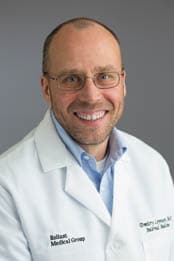
Dr. Dmitry Levenson first started practicing at Reliant Medical Group during the 1990s, then left after a time to practice in Savannah, Georgia. The fond memories of Reliant Medical Group never left him, however, and he decided to return here in 2009. “I always liked the atmosphere here,” he explains. “It’s great to practice in a place that puts the patients first.”
Dr. Levenson enjoys working in Internal Medicine, with its many diverse challenges. “As an internist, you have to know a little bit about everything, the variety is really unmatched for a physician. That makes it very interesting to me.”
In his work as an internist, Dr. Levenson tends to form strong bonds with his patients. “Over the years, many patients I have gotten to know have become my friends. This is an aspect of practicing medicine that I really enjoy. I remember many of my patients very fondly, and it was a real joy treating them.”
As a primary care physician, Dr. Levenson says one of the biggest challenges he faces is keeping up with the constant changes in medicine. “Medicine has always been an ever-changing field, but it seems like the pace of change has accelerated now. Whether it’s a new diagnostic technology or an important research study, physicians have to constantly keep aware of the many changes that are occurring.”
When he is not busy with his patients, Dr. Levenson enjoys spending time with his wife and family. He also enjoys playing tennis, hiking and kayaking, as well as traveling when he has the chance.
Offices and Locations
Overview
Specialties
Internal Medicine
Partnering Provider
Certifications
American Board of Internal Medicine
Education
Medical School: First Moscow Medical School
Internship & Residency: Saint Vincent Hospital
Languages Spoken
English
Russian
Insurance
Related News and Articles