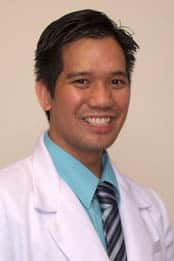
Thank you for viewing my profile. I care for Reliant patients in the hospital.
“You really have to get to know the patient well and treat them comprehensively.”
Dr. Ritche Lero, formerly a primary care physician, now works as a hospitalist, caring for patients of Reliant Medical Group admitted at Saint Vincent Hospital.
“There’s something about caring for patients in a hospital. It is somewhat different,” he explains. “Sometimes in a clinic setting it can be constricted by the time you spend with your patient. In the hospital, you can return to the patient and obtain more information much more easily if needed.”
Although working as a hospitalist is different from primary care medicine, Dr. Lero strives to make that strong connection with patients like a primary care physician does. “You really have to get to know the patient well and treat them comprehensively. Reassurance also is very important. You have to reassure patients that they’re going to receive the care that they need in the hospital and follow through.”
One of the things that Dr. Lero enjoys at Reliant Medical Group is the access to innovative technologies such as electronic medical records. “Being able to access a patient’s primary care records when they are in the hospital is a real advantage. You get a much more complete picture of the patient and that helps to make care safer and more efficient.”
Dr. Lero’s work at the hospital keeps him very busy, but when he has some free time he enjoys traveling, studying cultures, languages and photography.
Offices and Locations
Worcester Medical Center
Phone number: 1 (508) 852-0600
Address: 123 Summer Street, Worcester, MA, 01608
Overview
Specialties
Hospital Medicine
Certifications
American Board of Internal Medicine
Education
Saint Luke's College of Medicine, Medical Education
Caritas Carney Hospital, Internship
Caritas Carney Hospital, Residency
Languages Spoken
English
Spanish
Insurance
Related News and Articles