
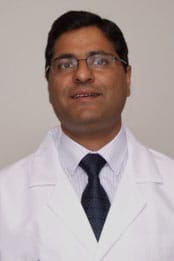
Thank you for viewing my profile. I care for Reliant patients in the hospital.
“I try to adapt to each patient’s individual needs.”
When he was growing up in India, Dr. Sudesh Kaul knew he wanted to practice medicine and use his skills to help others. “I had some family members who were sick when I was younger and it was hard for them to find good care,” he explains. “I saw what a good doctor could mean to a patient in need.”
Dr. Kaul enjoys his work as a hospitalist taking care of Reliant Medical Group patients. “For me, it’s very exciting because every patient presents a new challenge. We get to treat a lot of different types of illnesses here so it is very stimulating from a medical point of view.”
Like other hospitalists, Dr. Kaul relies on the latest technology to help him diagnose and treat illnesses. He enjoys using electronic health records, which have become an important advancement in healthcare. “With electronic medical records, you can go back in time and see what has happened with the patient. Plus, if you do a test, it comes to you in electronic form which is very convenient. You can even show your patients tests on the computer such as CT scans and MRIs and give them a better understanding of what is wrong.”
In working with his patients, Dr. Kaul strives to provide as personalized care as possible. “I try to adapt to each patient’s individual needs. Every patient is unique so you have to tailor the treatment to what is best for them. That way, you know you are providing the right care.”
When he is not at the hospital helping patients, Dr. Kaul enjoys watching movies with his wife and family and reading biographies and fiction. He also likes to play cricket, which he has enjoyed since his college days.
Please Note: Dr. Kaul provides acute medical care for patients who are admitted to Saint Vincent Hospital.
Offices and Locations
Worcester Medical Center
Phone number: 1 (508) 852-0600
Address: 123 Summer Street, Worcester, MA, 01608
Overview
Specialties
Hospital Medicine
Certifications
American Board of Internal Medicine
Education
Medical Education: University of Jammu & Government Medical College Jammu
Internship & Residency: Wyckoff Heights Medical Center
Languages Spoken
English
Hindi
Insurance
Related News and Articles